Try Beat Watcher on your Apple Watch
Requires Apple Watch Series 4 or newer (watchOS 9+).

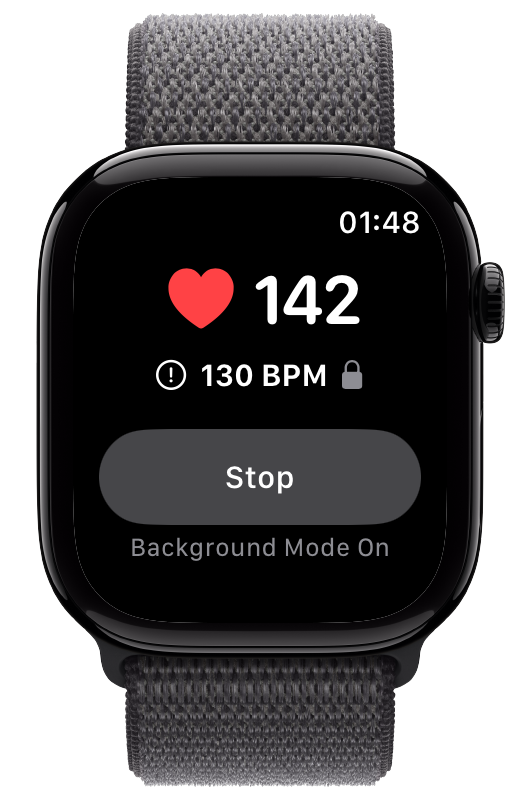
Most Apple Watch heart rate apps only watch for a high heart rate. Beat Watcher does both. Set a low heart rate threshold and Beat Watcher alerts you with haptic vibration and audio the moment your heart rate drops below it, with continuous background monitoring and optional overnight alerts.
For adults, a normal resting heart rate is generally between 60 and 100 beats per minute.[1] A resting heart rate under 60 BPM is often called bradycardia, which is simply the term for a slow heart rate.[2]
A low resting heart rate is frequently normal and healthy. The American Heart Association notes that heart rate can dip below 60 BPM during sleep, and that athletes and physically active adults often have a resting heart rate under 60 BPM because a well-conditioned heart pumps blood more efficiently and does not need to work as hard.[2] In endurance-trained individuals, a low resting heart rate reflects long-term adaptations in the heart itself, and resting rates in the 40s and 50s are common.[3]
Because what counts as “low” is personal, the most useful thing is to understand your own baseline. Many people simply like to watch their resting or overnight heart rate. If your doctor has asked you to keep an eye on a low heart rate, you can set an alert to match the guidance they gave you.
Apple Watch already has a built-in low heart rate notification, and it is a useful safety net. But it was designed as an occasional background check, not a real-time monitor. There are three practical limits to be aware of:
The built-in low heart rate notification checks roughly every 10 minutes of inactivity, so a brief dip between checks can go unnoticed.
You can only choose 40, 45, or 50 BPM. If the number that matters to you is 52 or 38, the built-in option cannot match it.
The notification arrives as a regular alert, which Do Not Disturb and Sleep Focus can mute, exactly when you may want it most overnight.
Beat Watcher monitors continuously, lets you pick any low threshold, and can sound an alert that cuts through silent mode on your phone.
Beat Watcher was built around a single idea: you set the threshold, and it tells you the instant your heart rate crosses it. That works just as well for a low limit as a high one.
Turn the Digital Crown to set a low threshold anywhere between 30 and 150 BPM, rather than the fixed 40, 45, or 50 the watch offers on its own. Pick a value that reflects your baseline or your doctor’s guidance, and Beat Watcher alerts you the moment your heart rate drops below it.
When your heart rate crosses your low threshold, Beat Watcher responds immediately with a haptic vibration on your wrist and an audible alert, so you do not have to be looking at the screen to notice.
Background Mode keeps Beat Watcher monitoring your heart rate even when your wrist is down, the screen is off, or you switch to another app. Unlike periodic checks, it tracks continuously so a low crossing is caught in real time.
When enabled, alerts repeat every few seconds for as long as your heart rate stays below your threshold. You will not miss the signal, even if you are focused on something else.
Regular notifications are muted by Sleep Focus and Do Not Disturb. Optional iPhone Phone Alerts with Critical Alerts mode play a sound on your phone even when it is silenced, which is what makes Beat Watcher useful as an overnight low heart rate monitor.
Set a low and a high threshold at the same time for complete coverage of your heart rate range. Watch the low end overnight while still being alerted if your daytime heart rate climbs above your upper limit.
Low and high alert events you save are kept in Alert History in the iPhone app, with start and end time, duration, the threshold at the start, and the starting, ending, and lowest or peak BPM. Add local notes and context tags, and export your saved history as a CSV file.
For more accurate readings, pair a Bluetooth chest strap like the Polar H10 with your Apple Watch. Chest straps can be steadier than optical wrist sensors, which helps when you are watching for a precise low value.
Only a few Apple Watch apps focus on the low end of your heart rate at all. Here is how the dedicated options compare, based on our review of each app in October 2026. All three alert you when your heart rate drops below a limit; they differ in how much control you get and what happens next.
Set any low threshold between 30 and 150 BPM, and an optional high one at the same time, with persistent haptic and audio alerts plus optional iPhone Critical Alerts that cut through Silent Mode and Sleep Focus for overnight use. Saved Alert History on iPhone lets you review low alert events later, add local notes and context tags, and export saved history as a CSV file. Alert Sharing can also notify trusted contacts who accept your invitation and let them review shared alert history without purchasing a subscription. Free to download. In the U.S. App Store, the optional annual plan costs $24 per year after a one-month free trial. Prices vary by country or region, and the App Store shows your local price before purchase. Best if you want a customizable low alert you can hear overnight and optionally share with someone you trust.
Cardiac Alarm sounds a loud siren on your Apple Watch when your heart rate drops below a low limit you set, with an optional high limit, and since its October 2026 update it can also sound an alarm on the iPhones of up to three people you choose. It costs $2.99 per month or $17.99 per year after a 7-day free trial. Best if you want a loud siren for urgent moments rather than day-to-day awareness.
Built around emergency SOS rather than personal pacing: when your heart rate crosses a high or low limit you set, it can text up to five listed contacts your name, heart rate, and a location link, using prepaid credits instead of a subscription. Best if you need SMS delivery without requiring the other person to install an app. Beat Watcher uses an invite-and-accept model in the Beat Watcher iPhone app, with recipient preferences and shared history instead of SMS credits.
If you want a customizable low heart rate alert for everyday awareness, Beat Watcher is the most flexible of the three. For a fuller comparison that also covers TachyMon and HeartWatch, see best heart rate alert apps for Apple Watch.
Requires Apple Watch Series 4 or newer (watchOS 9+).
For adults, a normal resting heart rate is generally between 60 and 100 beats per minute. A resting heart rate under 60 BPM is often described as bradycardia, the medical term for a slow heart rate. A low resting heart rate is frequently normal and healthy. The American Heart Association notes that heart rate can fall below 60 BPM during sleep, and that athletes and physically active adults often have a resting heart rate under 60 BPM because a well-conditioned heart pumps more efficiently. What a low number means depends on the person, so a value that is normal for one person may be worth discussing with a doctor for another. Beat Watcher is not a medical device and does not diagnose any condition; it simply alerts you when your heart rate drops below a threshold you choose.
Apple Watch has a built-in low heart rate notification, but it checks only periodically, roughly every 10 minutes of inactivity, and is fixed to a preset value of 40, 45, or 50 BPM. It is also delivered as a regular notification that Do Not Disturb can silence. Beat Watcher complements it by monitoring continuously in real time, letting you set any low threshold between 30 and 150 BPM, and offering optional iPhone Critical Alerts that play a sound even when your phone is silenced.
Yes. In Beat Watcher you turn the Digital Crown to set a low heart rate threshold anywhere between 30 and 150 BPM, instead of being limited to the fixed values Apple Watch offers. Choose a value that reflects your personal baseline or your doctor’s guidance, and the app alerts you with haptic vibration and audio the moment your heart rate drops below it. You can also set a high threshold at the same time for complete coverage of your heart rate range.
It can, if you set it up for overnight use. Regular notifications are silenced during Sleep Focus and Do Not Disturb, so Beat Watcher offers optional iPhone Phone Alerts with Critical Alerts mode that play a sound on your phone even when it is silenced. Combined with Background Mode, which keeps monitoring while your wrist is down and the screen is off, this lets the alert actually reach you overnight if your heart rate drops below the low threshold you set. Beat Watcher is not a medical device and does not diagnose any condition.
Often not. A low resting heart rate is common in healthy, physically active people and is frequently a sign of good cardiovascular fitness rather than a problem. What matters most is your personal baseline and how you feel. If your doctor has asked you to keep an eye on a low heart rate, you can set your Beat Watcher alert to match their guidance. Beat Watcher is a general wellness app, not a medical device, and it does not diagnose any condition. Always consult a healthcare professional for medical decisions.
It depends on what you need. Cardiac Alarm is a siren for urgent moments, with a low limit you set, an optional high limit, and alarms on up to three people’s iPhones. RscMe sends SMS messages to listed contacts using prepaid alert credits. Beat Watcher is the better fit if you want to choose your own low threshold between 30 and 150 BPM, get persistent alerts you can hear overnight through Silent Mode, watch a high threshold at the same time, and optionally share selected alerts and history with trusted contacts who accept an invitation. Beat Watcher is a general wellness app, not a medical device, and it does not diagnose any condition.
Related: Sleep Heart Rate Monitor · POTS Heart Rate Monitor · ME/CFS Heart Rate Pacing · Best Heart Rate Alert Apps · Pericarditis Heart Rate · Apps That Notify Family About Heart Rate