Try Beat Watcher on your Apple Watch
Free to download. Requires Apple Watch Series 3 or newer (watchOS 8+).

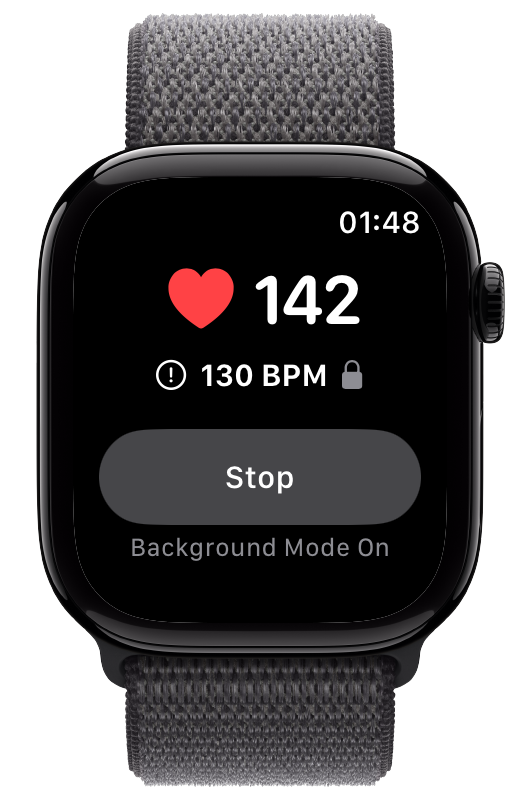
A heart rate alert app turns your Apple Watch into something that taps you on the wrist the moment your heart rate crosses a limit you set. This is an honest, hands-on comparison of the dedicated threshold-alert apps worth knowing about in 2026, including where each one is strongest.
A heart rate alert app watches your heart rate while you go about your day and alerts you when it crosses a threshold you choose, instead of making you remember to check a number. The built-in high and low heart rate notifications on Apple Watch are useful, but they are delayed and only check periodically in the background. A dedicated app gives you customizable limits and an immediate alert the moment your heart rate crosses one.
Not every app in this category does the same thing. Some let you set both a high and a low threshold, some only watch the low end, and some are built around texting emergency contacts rather than day-to-day pacing. Here is what to look for before you compare them:
The ability to set your own high and low BPM limits, rather than relying on fixed values, so the app matches your routine.
A haptic and audio alert the instant your heart rate crosses a limit, not a number you have to remember to glance at.
Continued monitoring when your wrist is down or another app is open, so you are not limited to when you look at your watch.
Optional alerts on your iPhone that can cut through Silent Mode and Focus for moments when the watch alone is not enough.
Each of these apps takes a different approach. We have credited what each one does best so you can match the tool to what you actually need.
Beat Watcher lets you set customizable high and low BPM thresholds with the Digital Crown and alerts you with instant haptic and audio feedback the moment your heart rate crosses one. Background Mode keeps monitoring when your wrist is down or you switch to another app, and persistent alerts repeat until you respond so you do not miss the signal. An optional iPhone companion adds Critical Alerts that cut through Silent Mode and Focus, and Bluetooth chest strap support such as the Polar H10 is available for added accuracy. It is free to download. In the U.S. App Store, annual access is $12 per year after a one-month free trial, or $50 once for lifetime access. Prices vary by country or region, and the App Store shows your local price before purchase. Requires Apple Watch Series 3 or newer on watchOS 8 or later. Distinctive strengths: persistent alerts, iPhone Critical Alerts, saved Alert History with local notes, context tags, and CSV export, plus Alert Sharing that lets trusted contacts receive selected threshold notifications and review shared alert history. Trusted contacts can accept and receive alerts without purchasing a subscription.
TachyMon runs on iPhone and Apple Watch with customizable upper and lower thresholds, and it can also alert you when your heart rate rises or falls a set amount from a recent rolling average. It was built with POTS in mind, its free tier covers the core alerts, and its premium tier of around $20 per year adds CSV and PDF data export plus iPhone-side sensor sessions. This is Beat Watcher’s closest direct alternative. Distinctive strengths: rolling-average alerts, PDF export, and iPhone-side sensor sessions.
Cardiac Alarm is a standalone Apple Watch and iPhone app focused on the low end only. It sounds a loud siren if your heart rate drops below a fixed value of 33 BPM or if the signal is lost. The low value is not customizable and there is no high threshold, so it is a narrow tool rather than a general pacing app. Distinctive strength: a simple, single-purpose low heart rate siren.
RscMe runs on Apple Watch and iPhone and is built around emergency SOS rather than day-to-day pacing. When your heart rate crosses a high or low limit you set, it can text up to five emergency contacts your name, your current heart rate, and a location link. Its SMS alerts use prepaid credits, so there is no subscription. Distinctive strength: alerting other people, not just yourself.
HeartWatch is a heart rate analytics app that tracks your daytime, sleep, and workout heart rate trends, and it includes background heart rate alerts. It is a one-time purchase of $8.99. Think of it as a richer-analytics alternative rather than a dedicated threshold-alert app. Distinctive strength: deep heart rate trends and history.
The right app depends on what you want it to do for you. Match your main goal to the strongest fit:
Beat Watcher and TachyMon are the two dedicated dual-threshold options. Beat Watcher leans toward persistent alerts, iPhone Critical Alerts, and saved Alert History with local notes, context tags, and CSV export; TachyMon leans toward rolling-average alerts, PDF export, and iPhone-side sensor sessions. Trying both is the fastest way to find your fit.
Cardiac Alarm is purpose-built for that, with a fixed 33 BPM siren. Just remember the value is not adjustable and there is no high threshold, so it will not help with tachycardia pacing.
Beat Watcher Alert Sharing is the fit when you want a trusted contact to accept an invitation, receive selected high and low threshold notifications in the iPhone app, control their own preferences, and review shared history without per-alert fees. RscMe is the fit when you specifically want SMS delivery to contacts who do not need an app, using prepaid alert credits.
HeartWatch is the stronger fit for analyzing your heart rate over time across day, sleep, and workouts, rather than for dedicated real-time threshold alerting.
If you want a single recommendation for a dedicated heart rate alert app on Apple Watch, the honest answer is that it comes down to Beat Watcher or TachyMon, because they are the two apps built around customizable high and low thresholds for everyday use. Both let you try before paying: TachyMon has a free tier, and Beat Watcher is free to download with a one-month free trial on its annual plan. In the U.S. App Store, Beat Watcher costs $12 per year or $50 once for lifetime access; prices vary by country or region. Beat Watcher is the stronger pick if you value persistent alerts that repeat until you respond, optional iPhone Critical Alerts that cut through Silent Mode and Focus, saved Alert History with local notes, context tags, CSV export, and a choice between annual and lifetime access. TachyMon is the stronger pick if you want alerts based on a rolling average, PDF reports, or iPhone-side sensor sessions. Cardiac Alarm, RscMe, and HeartWatch are each excellent at their narrower jobs, a fixed low siren, emergency texting, and trend analytics respectively, but they are not direct substitutes for a customizable dual-threshold alert app. The best choice is the one whose strengths match what you will actually use, and since the leading options all let you try before paying, you can confirm the fit on your own wrist first.
Free to download. Requires Apple Watch Series 3 or newer (watchOS 8+).
There is no single best app for everyone, because the right one depends on what you want it to do. For day-to-day pacing with customizable high and low thresholds, Beat Watcher and TachyMon are the two dedicated dual-threshold options. Beat Watcher stands out for persistent alerts that repeat until you respond, optional iPhone Critical Alerts that cut through Silent Mode and Focus, saved Alert History with local notes, context tags, and CSV export, plus Alert Sharing that lets trusted contacts receive selected threshold alerts and review shared history. It is a free download with U.S. App Store pricing of $12 per year after a one-month free trial or $50 once for lifetime access. Prices vary by country or region. TachyMon stands out for alerts based on a rolling average, PDF export, and iPhone-side sensor sessions. If you only want a low heart rate siren, Cardiac Alarm is purpose-built for that. If you want SMS delivery with no recipient app, RscMe is built around that. If you want richer trend analytics, HeartWatch is a stronger fit.
Yes. Beat Watcher is the closest direct alternative to TachyMon. Both let you set customizable upper and lower heart rate thresholds on Apple Watch and alert you when your heart rate crosses them. Beat Watcher adds persistent alerts that repeat until you respond, optional iPhone Critical Alerts that cut through Silent Mode and Focus, and saved Alert History with local notes, context tags, and CSV export. It is free to download. In the U.S. App Store, annual access is $12 per year after a one-month free trial, or $50 once for lifetime access. Prices vary by country or region. TachyMon offers alerts based on a rolling average, PDF export, and iPhone-side sensor sessions. Trying both is the best way to see which fits your routine.
Both apps let you set customizable high and low heart rate thresholds on Apple Watch and alert you when your heart rate crosses them, and both let you try the core alerts before paying. TachyMon has a free tier, while Beat Watcher is free to download with a one-month free trial on its annual plan. In the U.S. App Store, Beat Watcher costs $12 per year or $50 once for lifetime access; prices vary by country or region. The main differences are in extras. Beat Watcher offers persistent alerts that repeat until you respond, an optional iPhone companion with Critical Alerts that cut through Silent Mode and Focus, Bluetooth chest strap support such as the Polar H10, saved Alert History with local notes, context tags, and CSV export, and a choice between annual and lifetime access. TachyMon can also alert you when your heart rate rises or falls a set amount from a recent rolling average, and its premium tier of around $20 per year adds CSV and PDF data export plus iPhone-side sensor sessions.
Beat Watcher, TachyMon, and RscMe all let you set both a high and a low heart rate limit. Beat Watcher and TachyMon are designed for day-to-day threshold alerting, while RscMe is built around texting emergency contacts when a limit is crossed. Cardiac Alarm only covers a low heart rate and uses a fixed value of 33 BPM that you cannot change, with no high threshold.
Pricing varies by country or region, so the figures below are approximate U.S. prices. Beat Watcher is free to download. In the U.S. App Store, annual access is $12 per year after a one-month free trial, or $50 once for lifetime access. The App Store shows your local price before purchase. TachyMon has a free tier covering core alerts, with a premium tier of around $20 per year that adds PDF export and iPhone-side sensor sessions. RscMe has no subscription and uses prepaid credits for its text-message alerts. HeartWatch is a one-time purchase of $8.99. Many of these apps let you try core alerting before paying, so you can confirm the fit on your own wrist first.