Try Beat Watcher on your Apple Watch
Requires Apple Watch Series 4 or newer (watchOS 9+).

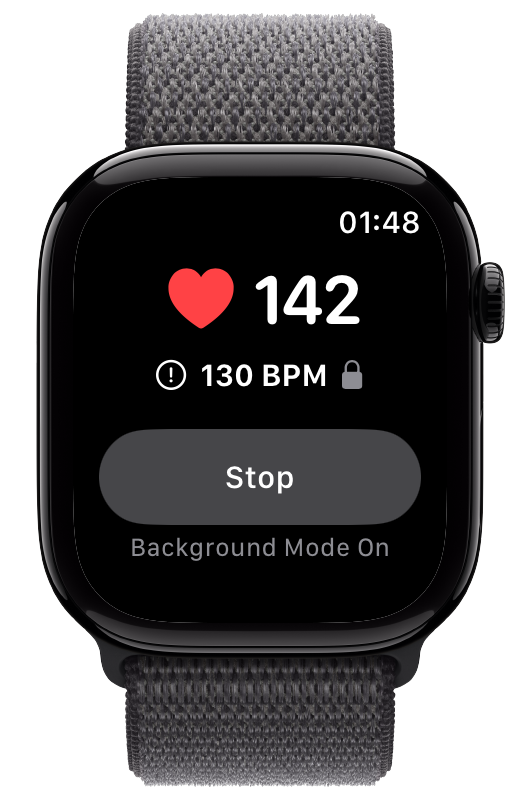
The short answer: not in real time, at least not natively. Apple Watch heart rate notifications go only to the person wearing the watch. Apple Health Sharing can pass a delayed copy to a family member, and a handful of third-party apps fill parts of the gap in different ways. Here is an honest map of what exists today, and what each option can and cannot do.
Apple Watch has built-in heart rate notifications for three situations: a high heart rate, a low heart rate, and an irregular rhythm notification.[1] All three are delivered to the wearer only. Two details matter if you were hoping someone else could act on them:
The high and low heart rate notifications fire only after your heart rate stays past the setting for a period of about 10 minutes while you appear inactive.[1] They are a background safety net, not a real-time alert.
You choose from preset values (for example 100 to 150 BPM for the high setting, 40 to 45 BPM for the low setting) rather than setting the exact number that matters to you.[1]
Apple Watch can notify your emergency contacts, but only through Fall Detection after a detected hard fall, or when you trigger Emergency SOS yourself.[2] There is no native way to have a heart rate threshold crossing notify another person.
Since iOS 15, the Health app can share data with a family member or friend. You invite them, they accept, and you choose which topics to share, including heart health notifications.[3] When your watch generates a high, low, or irregular rhythm notification, the person you share with can receive a copy.
The consent model is the best in this space: both people opt in, either side can stop sharing at any time, and the sharer controls exactly what is visible. The limitation is timing. Delivery rides on iCloud background syncing, and users report shared updates arriving anywhere from minutes to much longer after the fact. Combined with the roughly 10-minute detection window of the underlying notification, Health Sharing is best understood as a way for someone to stay informed about your heart health data, not a way for them to know promptly that something is happening right now.
If that trade-off fits your needs, it is free and built in. Apple’s setup guide is linked in the references below.[3]
A few apps approach the problem directly, each with real trade-offs. For a fuller side-by-side, see our comparison of apps that can notify family about heart rate.
RscMe watches your heart rate against limits you set and sends an SMS text message with your heart rate and a location link to contacts you list. The recipient needs no app, but there is no recipient consent step, and each alert consumes a paid credit, so alerts stop if credits run out.
Cardiogram’s paid Family Mode lets someone you share a code with view your heart rate data remotely. That is reviewing data on their own schedule rather than being notified the moment a threshold is crossed.
Services like BoundaryCare turn an Apple Watch into a monitored device for a parent or dependent, with heart rate alerts, GPS, and fall alerts sent to a caregiver app for a monthly subscription in the range of $25 per month. These are built for full-time caregiving of a person who is being looked after, rather than for an adult who simply wants a trusted person in the loop.
Beat Watcher is built around real-time thresholds for the wearer: set your own high and low BPM limits with the Digital Crown and get an instant haptic and audio alert the moment your heart rate crosses one, with continuous Background Mode monitoring. Optional Phone Alerts forward each threshold crossing to your own iPhone, and Critical Alerts mode can play a sound through Silent Mode and Do Not Disturb, which is what makes it usable overnight.
Beat Watcher can also notify a trusted contact through Alert Sharing. That request came from users most often when they lived alone or wanted another person to know about a threshold crossing.
Available in Beat Watcher 2026.23. Invite a trusted contact, let them accept in their own Beat Watcher app on iPhone, and they can receive a notification when your heart rate crosses a high or low threshold you set. Trusted contacts can accept and receive alerts without purchasing a subscription. Both people opt in, control high and low alerts independently, and can stop sharing at any time.
Alert Sharing combines your own custom thresholds, notification delivery to the other person’s iPhone, a consent step on both sides, shared alert history, and no per-alert fees. The paired owner iPhone must remain installed and available for supported delivery. Alert Sharing is an awareness feature for trusted contacts, not an emergency response or medical monitoring service.
Requires Apple Watch Series 4 or newer (watchOS 9+).
Not in real time. Apple Watch heart rate notifications, high, low, and irregular rhythm, are delivered only to the person wearing the watch. Apple Health Sharing can pass a copy of those notifications to someone you invite, but it depends on background syncing and is not designed for immediate delivery. Fall Detection and Emergency SOS can notify emergency contacts, but they are triggered by a detected hard fall or a manual SOS, not by heart rate.
No. Health Sharing shares data and copies of your heart health notifications with someone you invite, and both people must opt in. Delivery depends on iCloud background syncing, so the shared copy can arrive well after the fact. The underlying Apple notifications are also limited: the high and low heart rate settings use fixed values and are checked periodically, roughly every 10 minutes while you appear inactive, rather than continuously.
A few third-party apps cover parts of this. RscMe sends SMS text messages with your heart rate and location to contacts you list, using paid per-alert credits. Cardiogram offers a paid Family Mode that lets someone view your heart rate data remotely, which is reviewing data rather than receiving threshold alerts. Elderly-care platforms like BoundaryCare offer caregiver dashboards with heart rate alerts as part of a monthly monitoring subscription. Each takes a different approach to delivery, consent, and cost, so it is worth comparing them against what you actually need.
Yes. Beat Watcher Alert Sharing lets an eligible wearer invite a trusted contact, who can accept and receive high or low threshold alerts in the Beat Watcher iPhone app without purchasing a subscription. Both people can control high and low sharing independently, and either person can disconnect. Delivery requires the paired owner iPhone to remain installed and available. Alert Sharing is for awareness, not emergency response.
No. Heart rate threshold notifications are an awareness tool, not an emergency response service. Nothing on this page dispatches help, guarantees delivery, or monitors a medical condition. If you need emergency response, Apple Watch has Emergency SOS and Fall Detection, and dedicated medical alert services exist for that purpose. Beat Watcher is a general wellness app, not a medical device, and it does not diagnose, treat, or prevent any condition.
Related: Apps That Notify Family About Heart Rate · Living Alone With POTS · Sleep Heart Rate Monitor · POTS Heart Rate Monitor · Low Heart Rate Alerts · Best Heart Rate Alert Apps